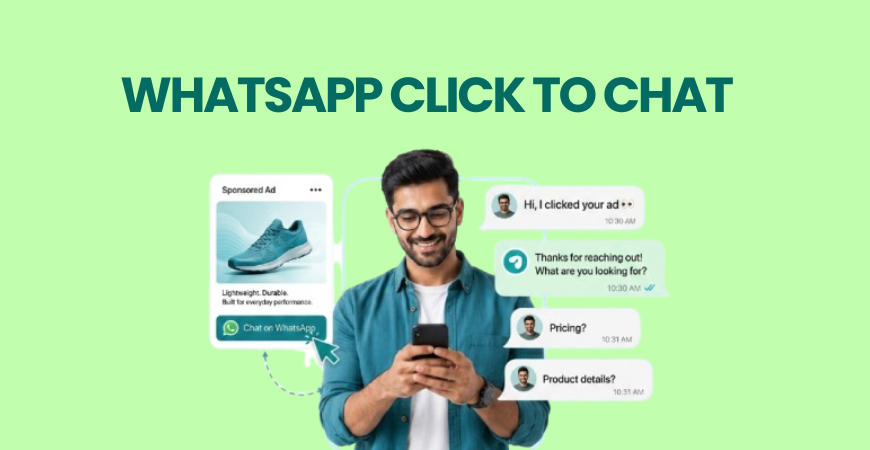
WhatsApp Click to Chat is a feature that lets customers start a WhatsApp conversation with your business by clicking a link, button, QR code, or advertisement—without having to save your phone number. It shortens the path between interest and action, helping businesses respond faster, capture more leads, and create a smoother customer experience.
Introduction
Getting a potential customer to contact your business is often the hardest part of the sales process. The more steps someone has to take before reaching you, the higher the chance they’ll lose interest. That’s why WhatsApp Click to Chat has become a simple yet effective way to remove friction from customer communication.
Instead of asking people to save your number manually, businesses can let users start a conversation with a single click. Whether someone arrives from your website, social media, or a paid ad, Click to Chat makes it easier to start conversations instantly, reduce drop-offs, and generate more qualified leads.
What Is WhatsApp Click to Chat?
WhatsApp Click to Chat is a feature that generates a unique link allowing customers to open a WhatsApp conversation with your business instantly. Users simply click the link, and WhatsApp opens with your business chat ready to begin. There’s no need to save your phone number first.
Businesses commonly use Click to Chat on:
- Websites
- Landing pages
- Social media profiles
- Google Ads
- Facebook and Instagram ads
- Email campaigns
- QR codes on offline marketing materials
Although the feature works on its own, businesses often combine it with a WhatsApp marketing platform to organize conversations, assign chats to team members, and monitor customer interactions more efficiently.
How WhatsApp Click to Chat Works
The process is straightforward and takes only a few steps:
- A business creates a Click to Chat link using its WhatsApp number.
- The link is added to a website, advertisement, social media profile, or QR code.
- A customer clicks the link.
- WhatsApp opens automatically with a conversation window.
- The customer sends the first message, and the business responds.
Businesses using the WhatsApp Business API can further enhance this process by allowing multiple team members to manage incoming conversations, integrate CRM systems, and handle larger messaging volumes.
Example
Imagine someone sees your Facebook advertisement for a free consultation. Instead of filling out a contact form, they tap the WhatsApp button and immediately ask for more information. That direct interaction often results in quicker responses and better lead quality.

Benefits of Click to Chat
WhatsApp Click to Chat offers more than convenience. It helps businesses reduce friction during the customer journey and encourages more people to start conversations.
Generates More Leads
Every additional step in a contact process can reduce conversions. Click to Chat removes unnecessary barriers by allowing users to message your business instantly.
Improves Response Speed
Customers can reach your business immediately instead of searching for contact details or filling out lengthy forms. When combined with WhatsApp automation, businesses can even send instant greetings or basic information before a team member joins the conversation.
Creates a Better Customer Experience
Most customers already use WhatsApp daily. Communicating through a familiar platform feels faster and more convenient than traditional contact methods.
Works Across Multiple Marketing Channels
A Click to Chat link can be added almost anywhere, including:
- Business websites
- Landing pages
- Google Business Profile
- Social media bios
- Paid advertisements
- Email signatures
- QR codes
As part of a broader WhatsApp marketing strategy, businesses can create a consistent communication journey regardless of where customers discover them.
Where Businesses Can Use Click to Chat
Almost any business that relies on customer enquiries can benefit from WhatsApp Click to Chat.
| Industry | Example Use Case |
| E-commerce | Product enquiries and order assistance |
| Education | Course admissions and counselling |
| Healthcare | Appointment bookings |
| Real Estate | Property enquiries |
| Travel | Holiday package enquiries |
| Local Businesses | Customer support and service bookings |
For example, a digital marketing institute may place a Click to Chat button on its course pages so prospective students can instantly ask about fees, syllabus, or career opportunities. Businesses offering digital marketing courses often use this approach to simplify student enquiries. Institutions like Academy of Digital Marketing (ADM) also use conversational channels to make it easier for learners to connect with counsellors before enrolling.
WhatsApp Click to Chat vs Traditional Contact Forms
| Feature | WhatsApp Click to Chat | Traditional Contact Form |
| Starts conversation instantly | Yes | No |
| Requires saving phone number | No | Not applicable |
| Response time | Usually faster | Depends on manual follow-up |
| Customer effort | Very low | Moderate |
| Mobile-friendly | Excellent | Good |
| Supports real-time conversations | Yes | No |
| Easy to measure with conversion tracking | Yes | Yes |
Compared to traditional contact forms, WhatsApp Click to Chat creates a more direct communication path. For businesses focused on generating enquiries and reducing response delays, it often provides a smoother experience for both customers and support teams.
How to Set Up Click to Chat
Setting up Click to Chat takes only a few minutes. Once the link is created, you can place it wherever customers are likely to contact your business.
Step 1: Create Your Click to Chat Link
Follow the Click to Chat guide to generate your business link using the correct wa.me URL format:
Replace yourphonenumber with your full phone number, including the country code, without spaces, brackets, hyphens, or the “+” symbol.
Step 2: Add a Pre-filled Message (Optional)
You can include a default message to help customers start the conversation.
Example:
“Hi, I’d like to know more about your services.”
This makes it easier for users to send the first message.
Step 3: Place the Link Strategically
Add your Click to Chat link to places where potential customers are most likely to engage, such as:
- Website contact pages
- Landing pages
- Facebook and Instagram ads
- Social media bios
- Google Business Profile
- Email signatures
- QR codes
Step 4: Test the Experience
Before publishing, click the link from both desktop and mobile devices to ensure it opens the correct WhatsApp conversation and any pre-filled message appears properly.
Best Practices for Generating More Leads
Simply adding a Click to Chat button isn’t enough. A few best practices can significantly improve the number and quality of conversations.
- Place the button where users naturally look for contact options.
- Use clear call-to-action text such as “Chat on WhatsApp” or “Get Instant Assistance.”
- Respond quickly to new enquiries.
- Use a pre-filled message that encourages users to start the conversation.
- Track how many visitors actually begin chats so you can optimize performance.
- If enquiry volume increases, consider adding automation to maintain quick response times.
Small improvements in accessibility and response speed often have a bigger impact than constantly redesigning your website.
Frequently Asked Questions
Is WhatsApp Click to Chat free to use?
Yes. The feature itself is free. However, your normal internet or messaging charges may apply depending on your business setup.
Do customers need to save my number?
No. Customers can start a conversation directly through the Click to Chat link without saving your phone number.
Can I use Click to Chat in ads?
Yes. Businesses commonly add Click to Chat links to Google Ads, Facebook Ads, Instagram Ads, websites, and landing pages to generate enquiries.
Can I track Click to Chat leads?
Yes. By using analytics tools and conversion tracking, businesses can measure how many users click the link and how many conversations become leads.
Is Click to Chat suitable for small businesses?
Absolutely. It’s one of the simplest ways for small businesses to make it easier for customers to get in touch without investing in complex communication systems.
Conclusion
WhatsApp Click to Chat removes unnecessary steps between customer interest and business conversations, making it easier to generate leads through a single click. Whether you’re a small business or a growing brand, placing Click to Chat links in the right locations, responding quickly, and continuously optimizing the experience can help turn more visitors into valuable customer enquiries.